If you’ve used ChatGPT for writing, you’ve probably noticed something odd. The AI loves em dashes those long horizontal lines that break up sentences. I mean, it really loves them.
Ask ChatGPT to write an email, and you’ll see em dashes everywhere. Request a social media post, and they appear again. This pattern has become so distinctive that readers can identify AI-generated text simply by looking for these punctuation marks.
Why This Matters
Em dashes aren’t inherently problematic. Professional writers incorporate them regularly into their work. However, ChatGPT overuses them to an excessive degree, creating two significant issues.
When you publish content containing multiple em dashes on Reddit or similar platforms, users will question your authenticity. They’ll assume you relied on ChatGPT rather than crafting original content. Regardless of quality or minimal AI assistance, those em dashes expose your methods.
The second issue proves even more frustrating. Writers who naturally favor em dashes in their personal style face false accusations of using AI. These authors find themselves defending their authentic writing because their preferred punctuation happens to match ChatGPT’s patterns. This situation is fundamentally unfair.
The Good News
ChatGPT 5.1 has resolved this long-standing problem. Sam Altman announced the fix on X after months of user complaints about excessive em dash usage. OpenAI now provides a straightforward solution integrated directly into the platform.
Small-but-happy win:
— Sam Altman (@sama) November 14, 2025
If you tell ChatGPT not to use em-dashes in your custom instructions, it finally does what it's supposed to do!
Rather than modifying the underlying model, OpenAI implemented a control mechanism that lets users dictate ChatGPT’s writing patterns. You can instruct it to eliminate em dashes, and the system will comply.
How to Remove Em Dashes
Eliminating em dashes from your ChatGPT outputs requires less than sixty seconds. Follow these steps:
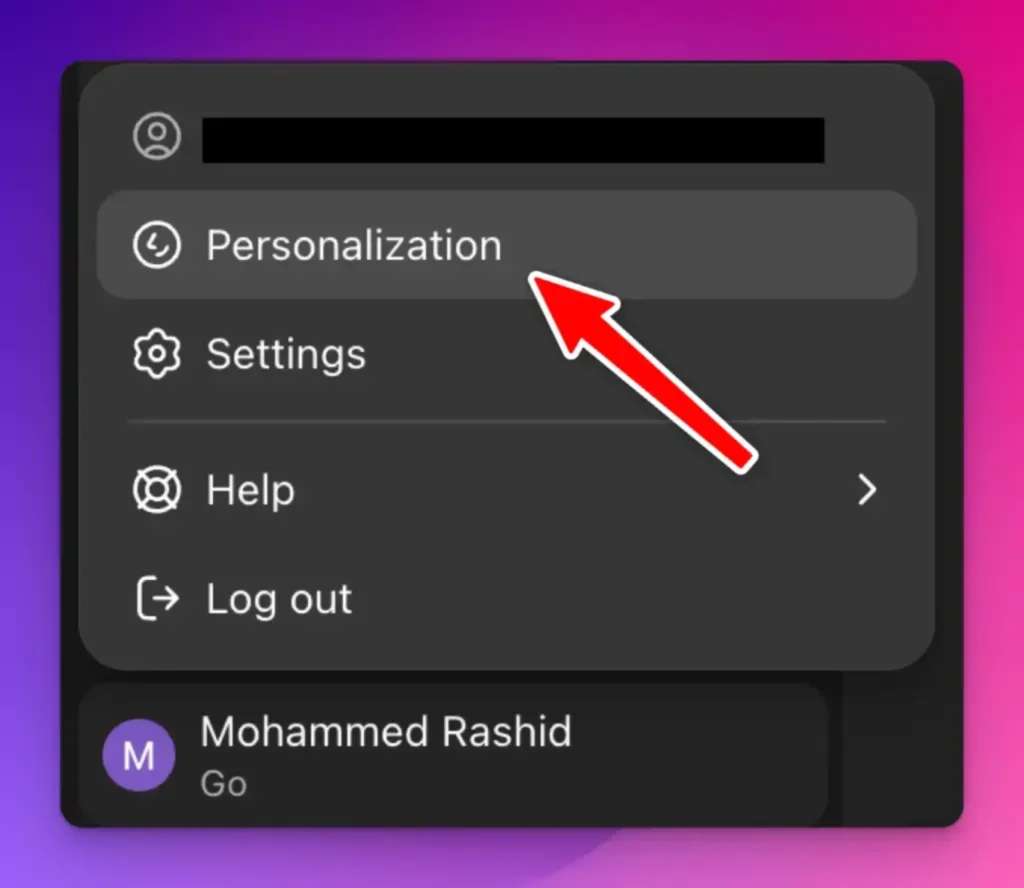
Navigate to chatgpt.com and sign into your account. Locate your profile picture in the bottom left corner and click to reveal the dropdown menu. Choose “Personalization” from the available options. If this option isn’t immediately visible, select “Settings” first, then access “Personalization” from the settings interface.
 How to Identify AI Photos using Gemini
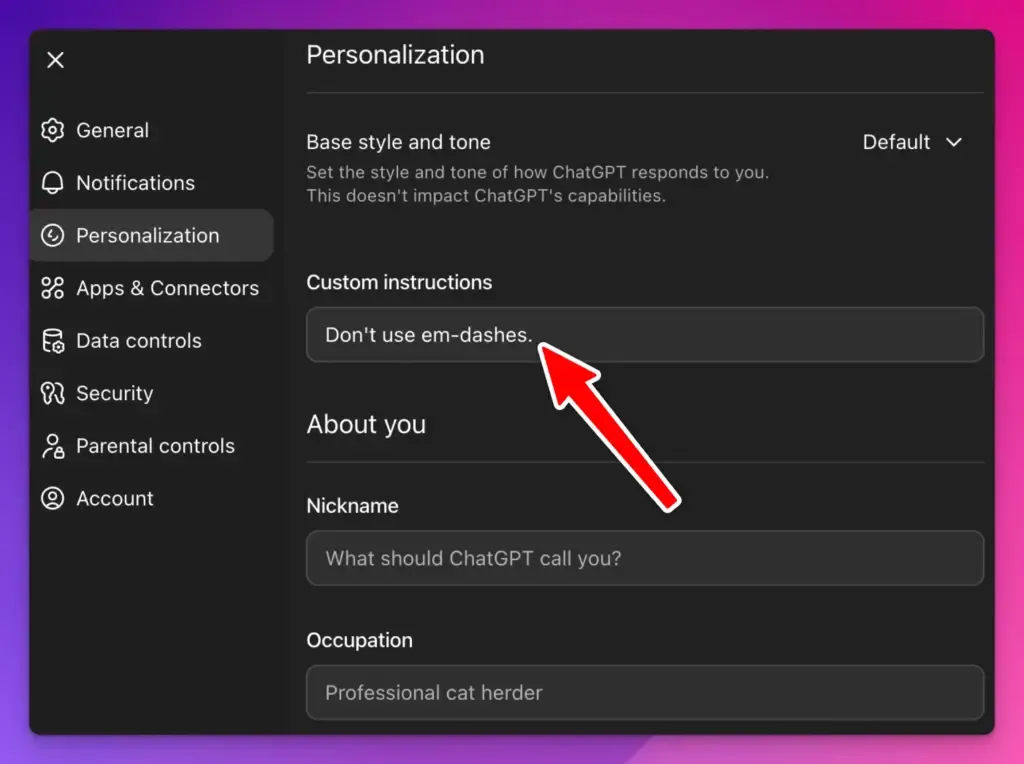
Find the custom instructions section where you can specify ChatGPT’s behavior preferences. Enter a straightforward instruction such as “Don’t use em-dashes” in the custom instructions field. While you can provide more detailed specifications, this brief phrase achieves the desired result. Save your modifications.
 What’s New in ChatGPT 5.1
The process is complete.
Test Your New Settings
Verify the changes by requesting ChatGPT to generate content for you. Ask for an email draft, blog post opening, or social media caption. Choose any format that would typically contain numerous em dashes.
Examine the output carefully. Em dashes should be completely absent. If they still appear in the response, revisit your custom instructions to confirm proper saving.
After implementing these settings, I conducted my own testing by requesting various content types from ChatGPT. The results showed zero em dashes while maintaining natural flow and readability.
Why This Feature Is Important
While this may appear to be a minor adjustment concerning a single punctuation mark, it represents a broader shift in AI tool development.
OpenAI actively responds to user feedback. Although the em dash issue didn’t compromise functionality, sufficient user complaints prompted action. The company empowered users with granular control over these writing details.
The custom instructions feature extends beyond em dash removal. You can leverage it to modify numerous aspects of ChatGPT’s writing style. Preferences for shorter sentences or casual tone can all be specified through this system.
Other Uses for Custom Instructions
While accessing personalization settings, consider additional modifications you might want. Several possibilities exist:
Specify a particular tone for ChatGPT’s output. Request conversational or formal language based on your requirements.
Define your preferred style parameters. Mention if you dislike lengthy paragraphs or want bullet points minimized.
Provide information about your background or professional field. This context enables more relevant and tailored responses.
Custom instructions persist across all conversations, eliminating the need for repetition with each new chat session.
What About Other AI Detectors?
Removing em dashes makes text appear less AI-generated, but other identifying patterns exist. AI-produced content often exhibits repetitive sentence construction or excessively formal language.
Nevertheless, addressing the em dash problem provides an effective starting point by eliminating one of the most conspicuous indicators of ChatGPT authorship.
When using AI for writing assistance, always review and revise the output. Inject your personal voice into the content. Modify generic-sounding sentences. Make the final product authentically yours.
Eliminating em dashes in ChatGPT has become remarkably simple. The custom instructions feature provides control over this troublesome quirk through a one-time configuration.
If the em dash issue previously deterred you from using ChatGPT, reconsider giving it another chance. The tool now offers greater flexibility, allowing you to shape outputs matching your style rather than conforming to AI-generated patterns.
For writers who naturally incorporate em dashes into their work, temporarily reconsidering these punctuation choices might prove beneficial. As long as em dashes remain associated with AI-generated content, they may create credibility challenges in online spaces.
The solution exists. It’s straightforward. It functions effectively. You now possess the knowledge to implement it.