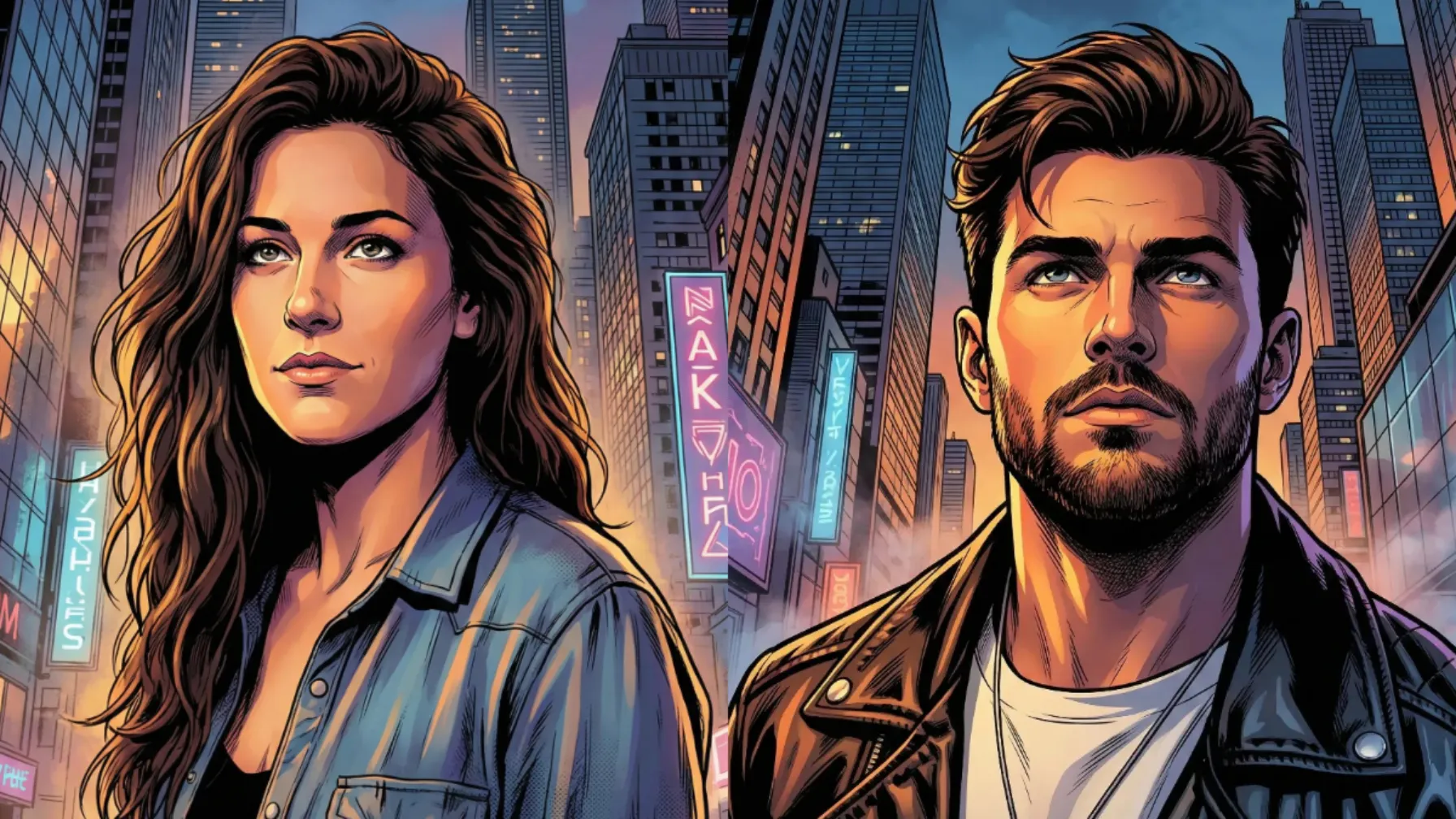
Comic-style illustrations have a unique charm. Bold outlines, intense colors, and exaggerated features give them an energy that instantly grabs attention. Whether it’s a classic hero stance or a dramatic city moment, comic art has a way of turning ordinary scenes into something cinematic and exciting.
The best part? You don’t need drawing skills or advanced editing software to create this look. Using Google’s Gemin i—especially the Nano Banana image model—you can transform everyday photos into eye-catching comic book artwork in just a few minutes.
Why Comic Book Style Works So Well
Comic book art stands out because it simplifies reality while keeping the personality intact. Bold black outlines make characters instantly recognizable, and the vibrant, deliberate colors give every scene energy and drama.
When you glance at a comic panel, you immediately sense the mood—whether it’s action-heavy, intense, or reflective. The art style communicates emotion before any dialogue appears. That’s the real strength of comic-style illustrations: they deliver feeling at a glance.
Get Started with Gemini
Go to gemini.google.com and sign in with your Google account. Start a new chat—this is where all the magic happens.
Click the attachment icon and upload your photo. You can use a portrait, a full-body picture, or even a casual selfie. Just remember: the sharper and clearer the original image is, the better your final comic-style result will turn out.
The Prompt That Works
Once your photo is attached, paste this prompt into the chat:
Create a dynamic, comic book style illustration of person in the attached photo looking upward, captured from a low-angle, heroic perspective. The scene takes place in a densely built urban cityscape at dusk, with towering skyscrapers framing the figure. Use dramatic, high-contrast lighting, a strong upward glow illuminating the man’s face and casting long, bold shadows in classic graphic-novel fashion. The person should appear powerful yet contemplative, expression focused as if witnessing something extraordinary above. Emphasize sharp inked outlines, punchy colors, and stylized shading typical of modern superhero comics. Add subtle environmental details such as distant neon signs, reflective glass surfaces, and atmospheric haze to enhance depth and scale.
Then hit send and wait. Within seconds, Gemini will process your photo and return a comic book version.
Examples: From Photo to Comic
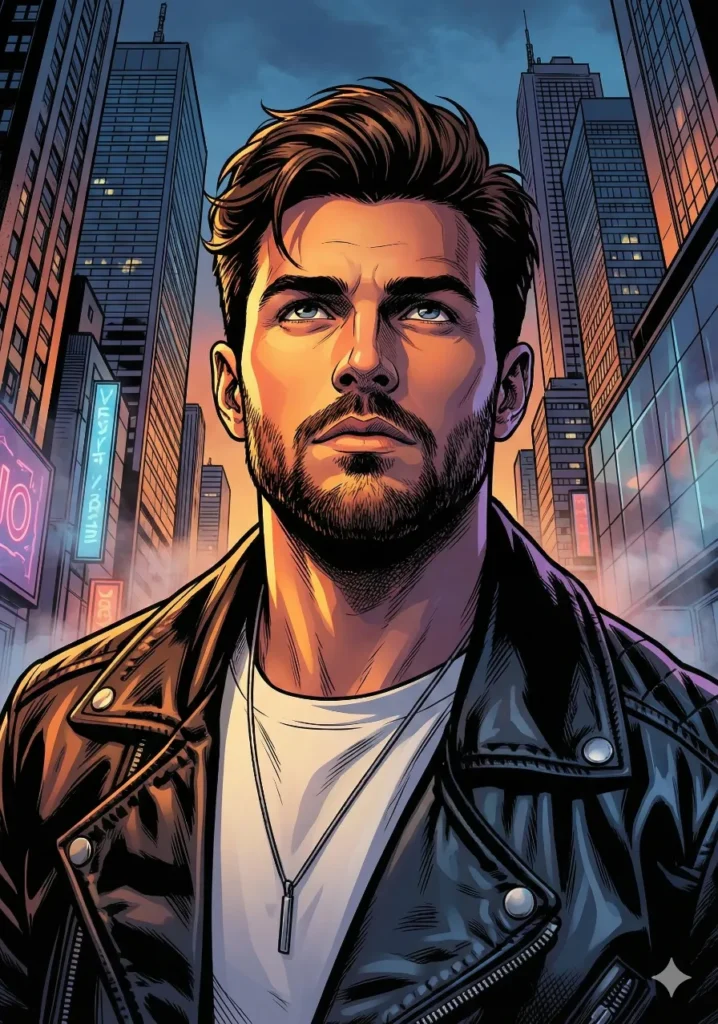
I tested this prompt with a photo of a man.

 How to Create Cute 3D Stores Using ChatGPT
After running it through Gemini, he appeared to be standing in an urban skyline at dusk, dressed in a way that felt comic-book authentic, with dramatic shadows across his face.
 How to Create Story Book Illustrations Using ChatGPT
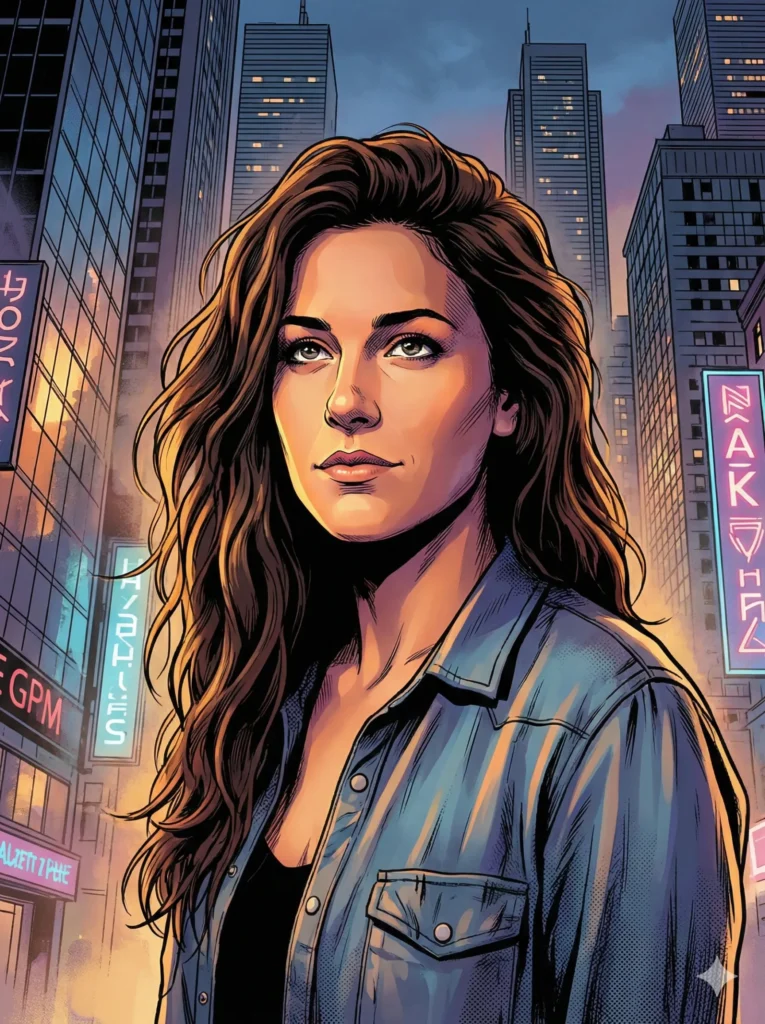
The second test was with a woman’s photo.

 26 Logo Styles You Can Create with ChatGPT
Her version showed her looking up at a city sky, with neon reflections visible on nearby buildings. The lighting made her expression look determined and powerful.
 How to Create Cool Retro Quote Posters Using ChatGPT
Both conversions took under a minute. Both looked like they belonged in an actual comic book.
Break Down of the Prompt
The prompt may look long at first, but every part plays a specific role. Here’s how each section works together.
“Dynamic, comic book style illustration” tells Gemini the exact visual style you want. Adding the word dynamic ensures the final image has motion and energy instead of looking flat or static.
“Looking upward, captured from a low-angle, heroic perspective” defines the camera angle. Low-angle shots naturally make the subject appear powerful, confident, and larger than life—classic comic book framing.
“Densely built urban cityscape at dusk” sets the environment. You aren’t just generating a character—you’re creating a full scene. Dusk lighting adds natural contrast and depth, which works extremely well in comic-style art.
“Towering skyscrapers framing the figure” gives context and structure to the composition. It prevents the subject from floating in empty space and makes the character feel grounded in a real world.
“Dramatic, high-contrast lighting” is essential for comic aesthetics. Bright highlights and deep shadows guide the viewer’s eye and create that bold, graphic-novel feel.
“Strong upward glow illuminating the face” ensures the character’s expression is visible and striking. It pulls attention to the most important part of the image — the face.
“Bold shadows in classic graphic-novel fashion” reminds the model to use solid, defined shapes instead of soft gradients. This is a signature element of comic art.
“Powerful yet contemplative” sets the emotional tone. It tells Gemini you want a character who looks strong, but not overly aggressive — someone thoughtful, heroic, and human.
“Sharp inked outlines, punchy colors, and stylized shading” specifies the technical details. Strong outlines, saturated colors, and intentional shading are the backbone of comic illustration.
“Neon signs, reflective glass, and atmospheric haze” add texture and life to the environment. These extra details keep the background from looking empty or flat.
Customize for Your Needs
The sample prompt is perfect for urban, heroic scenes, but you can tweak it easily.
- Want a fantasy world?
Replace the city with “enchanted forest,” “floating ruins,” or “ancient temple.” - Want different lighting?
Swap “dusk” for “night,” “sunrise,” “golden hour,” or “neon-lit street.”
The structure stays the same:
style → pose → setting → lighting → mood → technical details.
The more specific you are, the better Gemini performs.
Tips for Better Results
- Start with a clear, well-lit photo. Poor lighting or blurry images make it harder for the model to capture your features.
- Make sure your face or subject is visible and unobstructed for the cleanest transformation.
- Try multiple versions of the prompt. Even small adjustments to lighting or setting can completely change the final look.
Gemini’s Nano Banana model makes comic-style illustration incredibly accessible. It’s fast, free, and surprisingly accurate. With just a photo and a few instructions, you can turn an ordinary image into artwork that looks ready for a graphic novel.
Open your Gemini app, upload your photo, paste the prompt, and hit generate. In under a minute, you’ll have your own comic book-style illustration — and once you see it, you’ll probably want to make more.
That’s the real magic of this tool: it takes something that once felt complex and turns it into something anyone can do with ease.