There’s something truly timeless about sketches. They have a unique ability to capture the soul of a person or a moment without being distracted by unnecessary details. A well-made sketch feels raw, expressive, and artistic—often conveying emotion more powerfully than a standard photo.
What I’ve always admired about sketches is how they remove visual noise and focus on what truly matters: clean lines, subtle shadows, and genuine expressions. That appreciation is exactly why I was excited to discover that I could transform ordinary photos into stunning sketches using Google Gemini’s nano banana image model.
Google Gemini offers a powerful image-editing experience, and its nano banana model stands out for its ability to convert photos into refined, artistic sketches. The results feel natural and thoughtfully crafted, not artificial or over-processed.
One of the biggest advantages of this model is its simplicity. You don’t need any design background or technical expertise. All it takes is a photo and a clear, well-written prompt describing the sketch style you want.
After testing it on dozens of images, the results have been consistently impressive. Each sketch looks clean, professional, and artistically balanced—like it was drawn by a skilled illustrator rather than generated by an AI tool.
How to Get Started
Head over to gemini.google.com and start a new chat. Then upload your photo and use the following prompt. That’s it. You’re ready to go.
The real power comes from what you ask Gemini to do. A vague request gets vague results. A specific, detailed prompt gets something you’ll actually want to use.
The Prompt That Works : How to Turn Your Photo into Beautiful Sketch Using Gemini
Here’s the prompt I use. It produces excellent results almost every time:
Create a clean black and white vector sketch portrait of the person in this photo in a minimalist style. Show the head and upper shoulders. Use smooth shading and bold contour lines with a balanced mix of realism and simplicity. The expression should be confident and calm. The background should be plain light gray or white. The art style should look like a digital ink drawing with subtle gradients for depth.
Let me break this down so you understand what each part does.
“Create a clean black and white vector sketch portrait” – This tells Gemini exactly what style you want. Black and white keeps it classic. Vector sketch tells it to use clean lines rather than smudges or gradients. Portrait tells it to focus on the face.
“of the person in this photo in a minimalist style” – You’re setting the tone here. Minimalist means don’t add extra details that aren’t needed. Simplify. Focus on what matters.
“Show the head and upper shoulders” – This gives Gemini framing instructions. You’re not asking for a full body. Just the important parts. Head and upper shoulders are flattering and intimate.
“Use smooth shading and bold contour lines” – Smooth shading adds depth without looking rough. Bold contour lines make the sketch pop. This combination stops the image from looking flat or boring.
“with a balanced mix of realism and simplicity” – Don’t go too abstract. Don’t go too photorealistic either. Find the middle ground. That’s where the magic happens.
“The expression should be confident and calm” – This is about mood. You’re telling the AI what feeling to convey. It’ll adjust the facial features and lines to match this attitude.
“The background should be plain light gray or white” – A plain background keeps focus on the sketch itself. No distractions. No weird gradients or patterns.
“The art style should look like a digital ink drawing with subtle gradients for depth” – This final line nails down the exact aesthetic. Digital ink drawing sounds like something an artist would make in Procreate. Subtle gradients add dimension without overdoing it.
Real Examples That Show It Works
I tested this prompt on photos of different people, and the results were striking.
I took a photo of a man in his 30s.

 How to Create Cool Retro Quote Posters Using ChatGPT
The sketch came out clean and professional. The lines were sharp where they needed to be. The shading added just enough depth to make his face look three-dimensional.

 How to Create Paper Craft Illustrations Using ChatGPT
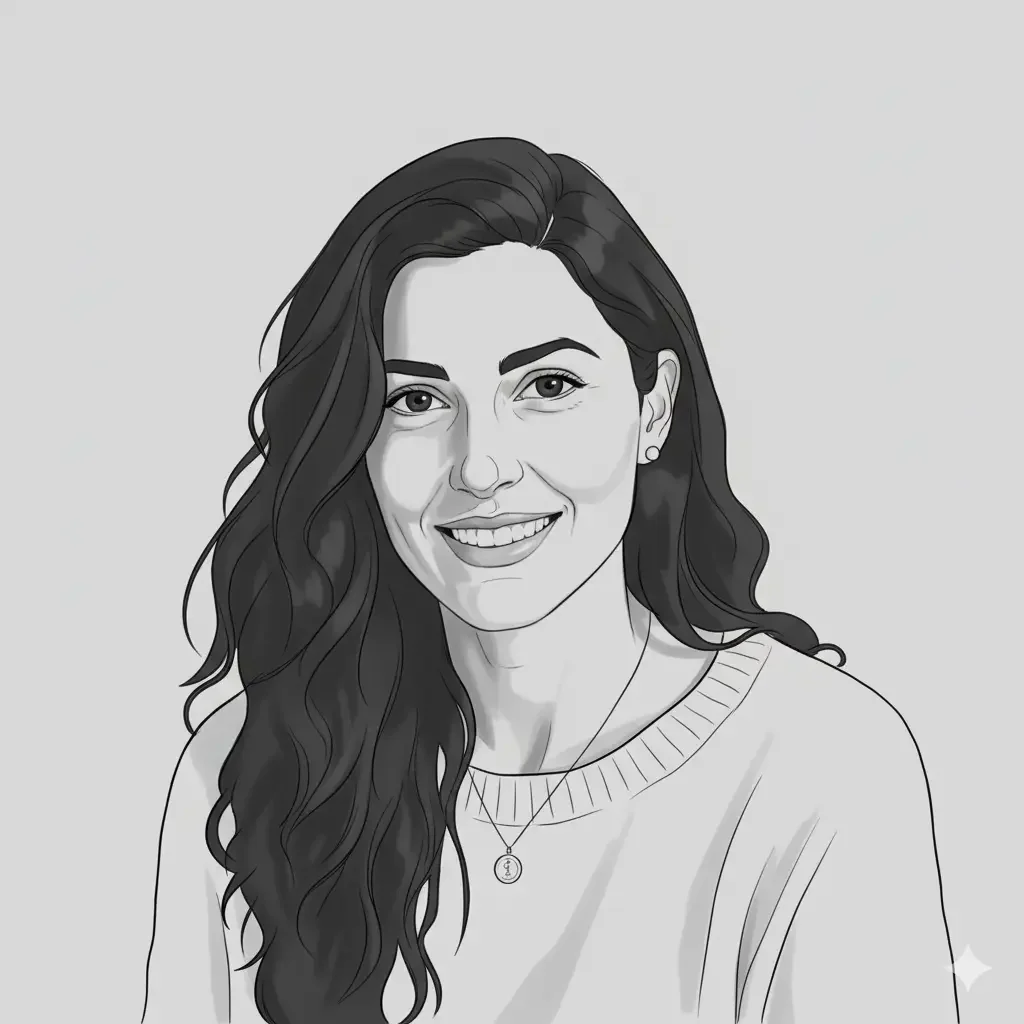
Then I tried it on a photo of a woman with longer hair and a smile.

 How to Turn Your Photo into Comic Book Illustration Using Gemini
The sketch preserved her friendly expression perfectly. The hair flowed naturally even in the minimalist style. The subtle gradients under her cheekbones and around her eyes gave the sketch life and dimension.
 How to Turn Your Photo into a Caricature Using Gemini
Both sketches looked like professional artwork. The kind of thing you’d see in a design portfolio or on someone’s website.
Why Sketches Work
Sketches have a character that’s hard to replicate with other art styles. They’re simple, yet full of emotion. Minimal, yet deeply intentional. Instead of merely documenting how something looks, a sketch reflects how it’s perceived.
Unlike photos, sketches guide your attention. You start to notice subtle details—the contours of a face, the posture of the body, the emotion carried in the eyes. It feels less like looking at an image and more like truly seeing the person.
That’s what gives sketches their lasting appeal. And thanks to AI tools like Gemini, creating them no longer requires artistic talent or technical skills.
Just open the Gemini app, upload your photo, paste the prompt, and press enter.
In moments, your photo transforms into a clean, stylish sketch that actually looks professional—no drawing ability or design experience needed.
This is the real advantage of tools like Gemini: they remove barriers and make creativity available to everyone.