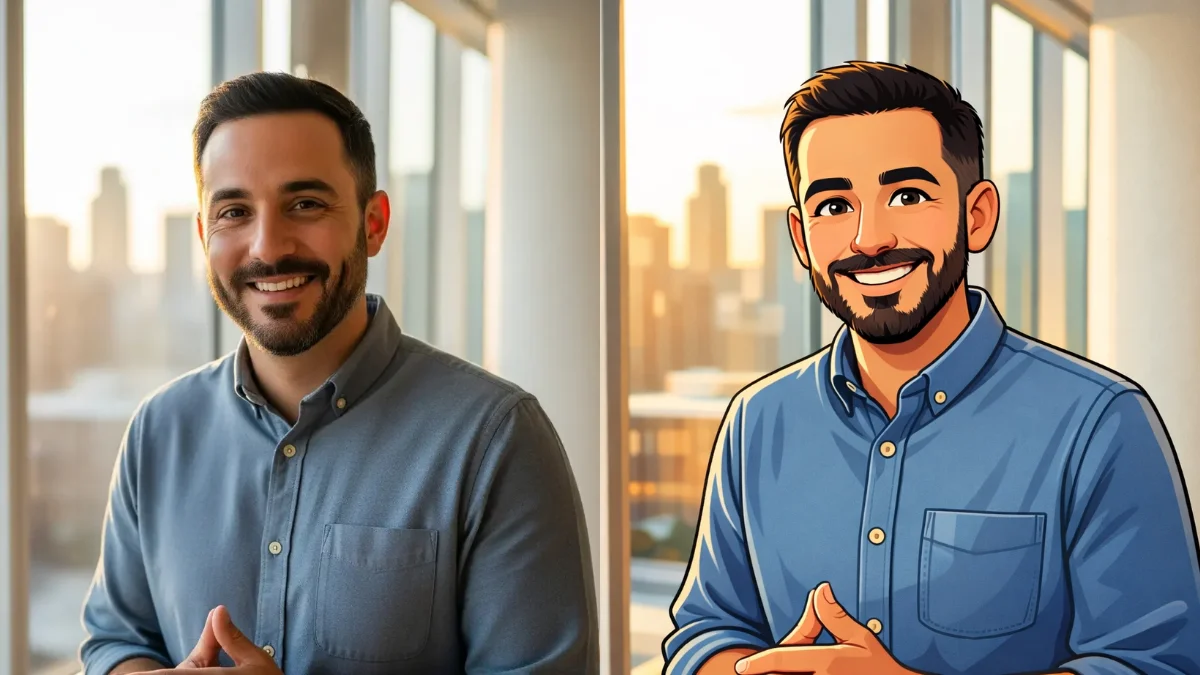
Cartoons hold a special charm that regular photographs simply cannot match. They cut through visual noise and highlight what truly matters—expression, emotion, and character. There’s an inherent playfulness to cartoons that makes them instantly appealing.
The cartoon format has endured for generations because it resonates with people. A cartoonized version of your face communicates personality in ways that feel both humorous and authentic. It distills your features into something memorable.
What previously required professional artists and hours of work now happens in seconds. The technology shift here is remarkable.
Not long ago, converting a photo into a cartoon through ChatGPT demanded elaborate prompts. You needed paragraphs of specific instructions covering artistic style, line thickness, shading preferences, and visual direction. The process was tedious and often frustrating.
ChatGPT has revolutionized this entirely. The latest image generation capabilities, powered by Images 1.5, deliver exceptional results with minimal input. The output is sharper, richer in detail, and authentically cartoon-like.
The real breakthrough? ChatGPT now offers built-in templates. No writing required. Upload your image, click once, and you’re finished.
The Step-by-Step Process (Photo into Cartoon)
Here’s the complete walkthrough. The simplicity might surprise you.
Step 1: Get to the Images Section
Launch ChatGPT through your mobile app or visit chatgpt.com on desktop. Locate the menu icon and click it. Select the “Images” option from the available choices.
 How to Create a Personalized Comic Strip with Gemini
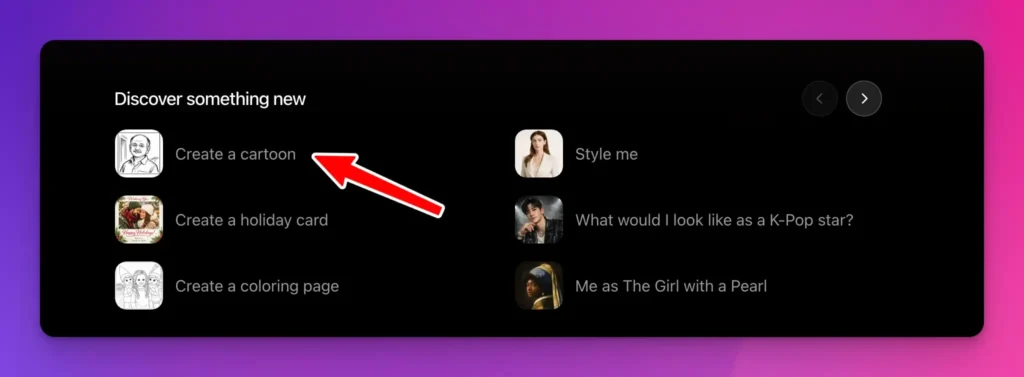
Step 2: Find the Cartoon Template
Scroll through the options until you spot “Create a cartoon.” Select it. Nothing more to configure.
 How to Create Cute Halloween Characters Using Meta AI
Step 3: Upload Your Photo
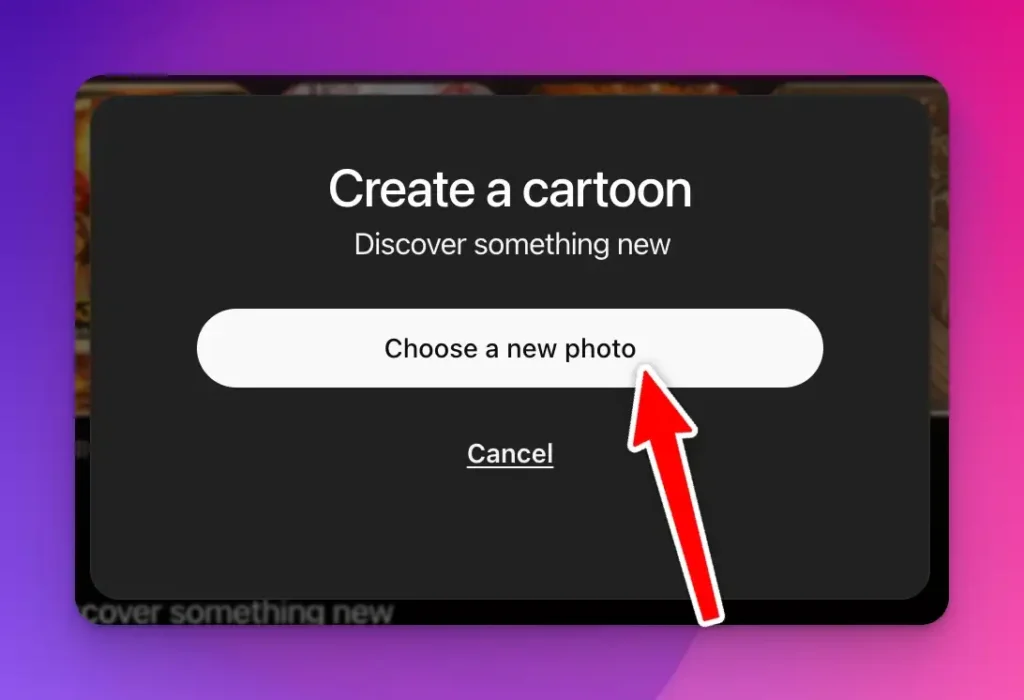
The interface prompts you to add an image. Click “Choose a new photo” and select any picture from your device. Selfies, portraits, group shots—any image works perfectly.
 How to Create Cute Monsters Using ChatGPT
For example, I uploaded the following photo.

 How to Turn Your Photo into a Caricature Using Gemini
Step 4: Wait for the Results
Click generate and allow roughly 10-15 seconds for processing.
Your cartoon is ready.

 How to Create Paper Craft Illustrations Using ChatGPT
What’s Happening Behind the Scenes?
Although invisible to most users, ChatGPT applies a pre-written prompt automatically. When I tested this feature, the underlying prompt read:
Transform the uploaded photo into a cartoon drawn in the style of a famous Indian cartoonist. Keep the image simple, defining forms with just a few confident strokes. Simplify clothing and furniture to bare-minimum linework.
This approach is genuinely clever. OpenAI’s team crafted this prompt based on what makes cartoons effective, embedding that expertise directly into the template.
The instructions guide the AI toward clean linework, professional cartoonist techniques, and emphasis on essential details. This explains why outputs look polished rather than like cheap smartphone filters.
You can view this prompt beneath any generated image. It offers interesting insight into how AI interprets your photograph.
Where Can You Actually Use These Cartoons?
The practical applications extend far beyond novelty. Cartoon portraits serve genuine purposes.
Social Media Profiles
Cartoon profile pictures command attention across platforms. They’re distinctive and memorable compared to standard photos. Whether on LinkedIn, Twitter, Instagram, or TikTok, a cartoon avatar projects approachability and personality.
Content Creation
Bloggers and YouTubers benefit significantly from cartoon self-portraits. They work brilliantly as thumbnails, headers, and in-post graphics. Cartoons inject character without appearing overly polished or corporate.
Presentations and Videos
Workplace presentations gain visual interest when cartoon versions break up text-heavy slides. Videos become more engaging. It demonstrates willingness to present yourself creatively.
Stickers and Print Materials
Download these images for physical applications. Print them on stickers, apparel, mugs, or business cards. A cartoon on your business card creates lasting impressions that standard photos cannot achieve.
Team Branding
Collaborative projects and small businesses benefit from cartoon team portraits. They establish visual cohesion while adding warmth. The approach humanizes your brand.
Book Covers and Illustrations
Authors find cartoon self-portraits valuable for memoirs or self-published works. They’re more affordable than commissioned illustrations while capturing personality appropriately for certain genres.
Marketing Materials
Email campaigns, social posts, and advertisements featuring cartoon versions consistently outperform standard photography in engagement metrics. Illustrated content attracts attention naturally.
Greeting Cards
Create personalized cards featuring your cartoon face for birthdays and holidays. Recipients appreciate the thoughtfulness and humor.
This tool succeeds because it eliminates barriers. Artistic knowledge isn’t necessary. Technical prompt-writing skills aren’t required. Upload and receive professional-quality results.
The Images 1.5 model produces genuinely usable output. Results aren’t flawless every time, but consistency is impressive.
Consider this advantage: cartoons remain timeless. Your cartoon portrait looks identical years from now. Trendy photo filters fade quickly.
This feature appears modest until you experience it. Quick execution, no cost for ChatGPT users, and genuinely practical output.
I’ve returned to this tool repeatedly, discovering fresh applications each time. It’s enjoyable and offers a new perspective on familiar faces.
Try it now if you haven’t already. Upload any photo and observe the results. The quality will likely exceed your expectations.
That covers everything you need to know.